What Really Happens After You Run a SQL Query - SQL Journey
What the database does after you hit enter
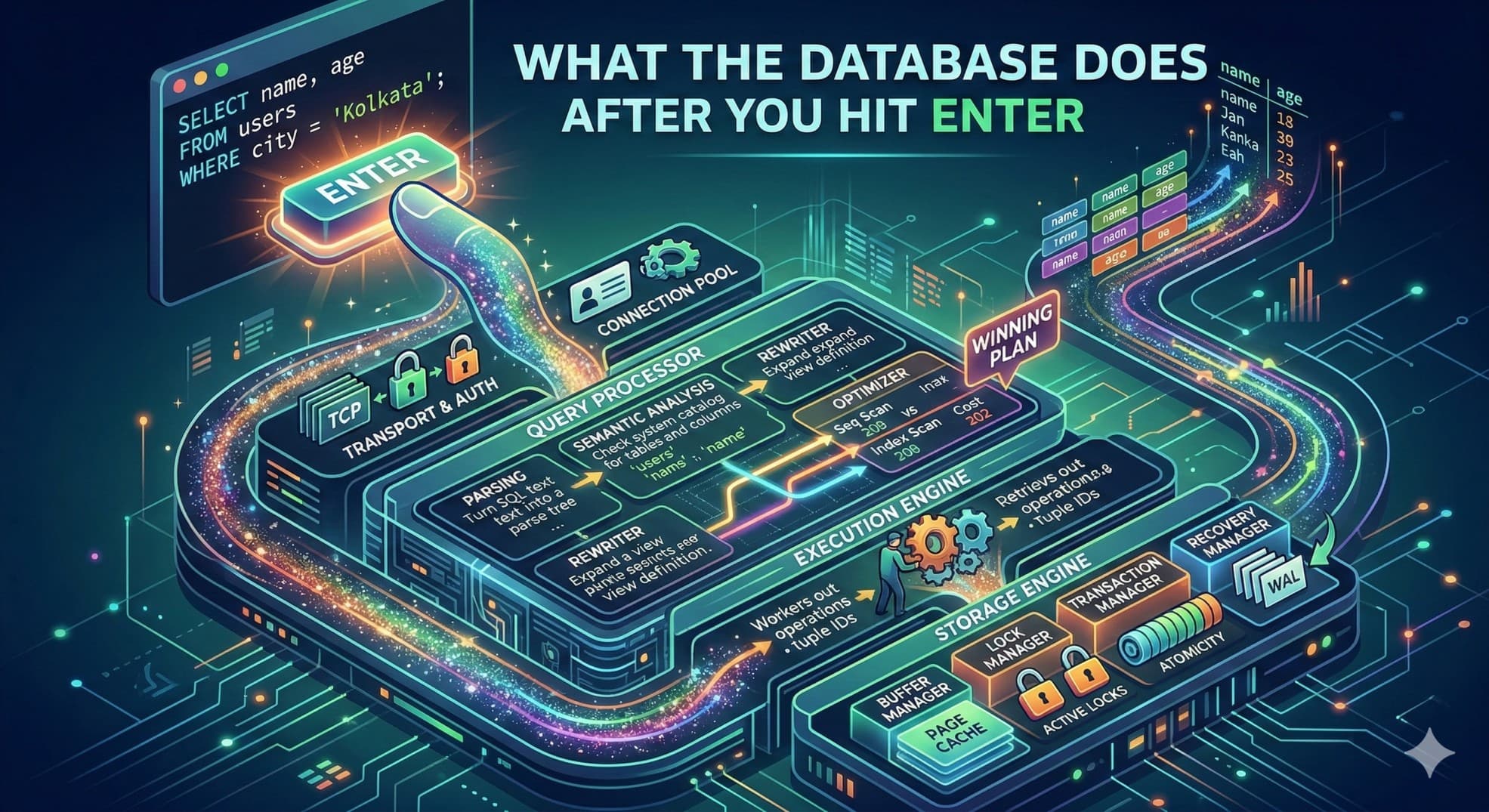
I just finished a project where we were hitting an internal database - large dataset, reads happening constantly, the kind of workload where every extra millisecond compounds into something users actually feel. At some point I stopped tuning blindly my application code and asked myself a question : what actually happens between the moment my application sends a query and the moment rows come back?
I had a rough idea. But rough don't tell you why adding an index sometimes does nothing. They don't tell you which of the five layers your query is getting stuck in. My philosophy has always been the same - you can't optimize what you don't how background processing is working in the first place. Find how the thing actually works, find the gaps, fix the gaps.
You write a query. You hit enter. Data comes back.
I stopped there. I got what what i needed, move on. But that "hitting enter" part? There's a lot happening underneath it that most people never bother to understand and until this point neither do i - and that's fine, until queries get slow or production breaks and you have no idea where to even start looking - it comes with experience.
I've seen engineers with years of experience stare at a slow query and just add more hardware. Sometimes that works. Usually it doesn't. Because the problem wasn't resources - it was that the database chose a bad plan, or there was no index, or someone didn't wrap two writes in a transaction. Things you'd catch instantly if you understood what happens after you hit enter.
The Query
SELECT name, age FROM users WHERE city = 'Kolkata';
Simple enough. But the path this takes inside the database isn't simple at all. There are at least five distinct layers it passes through, each doing something completely different. Miss any one of them and you're working with an incomplete model. Incomplete models lead to wrong assumptions. Wrong assumptions lead to 3am incidents which i had past experiences with.
Step 1 - Transport Layer
Before the database reads a single character of your SQL, it first has to receive it.
Your application sends the query over TCP. Raw bytes. The database is listening on a port - 5432 for Postgres, 3306 for MySQL - and receives those bytes according to a wire protocol. Postgres has its own. MySQL has its own. They're not interchangeable, which is why your MySQL driver doesn't work against a Postgres server and gives you an error that feels completely unrelated to the actual problem.
Authentication happens here too. The database checks your credentials, then checks whether your user has SELECT permission on the table you're querying. If not, the query dies right here. Doesn't even get parsed.
Now, something a lot of junior engineers don't think about: opening a TCP connection costs real time. You've got the three-way handshake, memory allocation on the server side, thread assignment - it adds up. If your application opened a fresh connection for every single query, you'd spend more time connecting than actually running SQL. This is why connection pooling exists.
# The pool is created once when your app starts
pool = psycopg2.pool.ThreadedConnectionPool(minconn=5, maxconn=20, dsn="...")

# Every request borrows a connection that's already open
conn = pool.getconn()
I've seen applications that weren't using a connection pool go from 800ms average query time down to under 50ms just by adding one. The queries themselves didn't change. The database didn't change. Just stopped paying the connection overhead on every request. It's one of those fixes that feels too simple to be real until you see the numbers.
Step 2 - The Query Processor Layer
This is where most of the work happens. There are four distinct things happening inside it, and collapsing them into one is how people end up with broken mental models that don't help when something actually goes wrong.
Parsing
The parser reads your SQL as plain text and decides whether it's even valid. It doesn't know your tables, doesn't know your schema, doesn't care about any of that yet. It just checks whether the words and symbols you wrote form a legal sentence in SQL's grammar. A misplaced comma, a typo in a keyword, a quote you forgot to close - any of it stops everything cold.
SELCT name, age FORM users WHERE city = 'Kolkata';
-- ERROR: syntax error at or near "SELCT"
Nothing else runs. Not the semantic check, not the optimizer. Just an error.
If the syntax is valid, the parser produces a parse tree - your query represented as a data structure instead of text. The SELECT is the root. The column list, the FROM, the WHERE - each becomes a node. That tree is what every other step works from. You never see it. But every query you've ever written turned into one the moment you hit enter.
The Semantic Analyzer - missing from the original diagram
The parser said the sentence is grammatically correct. The semantic analyzer asks whether it actually means anything.
It goes to the system catalog - the database's own internal record of everything that exists in it, every table, every column, every type - and checks whether the things you named are real. Does a table called users exist? Does it have a column called name? Is city a text column, or something else you can't compare to a string?
-- Valid syntax, fails semantic analysis
SELECT name, age FROM users WHERE city = 'Kolkata';
-- ERROR: relation "users" does not exist
That error you've seen a hundred times - relation does not exist, column does not exist - that's this step catching a typo before anything else runs. The reason it's separate from parsing is that the parser has no idea what tables you have. It only knows grammar. The semantic analyzer is the part that connects the words in your query to real objects in your database. Once I understood this, those errors stopped feeling cryptic. They're just the catalog saying "I checked, and that thing isn't here."
The Rewriter
Once semantics pass, the query may be rewritten into a different form before optimization begins.
The clearest example is views. When you query a view, the database doesn't run the view separately and combine the results. It expands the view's definition directly into your query before the optimizer sees anything at all.
-- Assume you defined this earlier
CREATE VIEW active_users AS
    SELECT * FROM users WHERE status = 'active';

-- You write this
SELECT name FROM active_users WHERE city = 'Kolkata';

-- The rewriter turns it into this before anything else happens
SELECT name FROM users
WHERE status = 'active' AND city = 'Kolkata';
The optimizer never knows a view was involved. It just gets a clean query against a real table. This is actually reassuring once you know it - it means using a view doesn't cost you anything at the query level. The abstraction is free. The rewriter handles the expansion silently so the optimizer never has to reason about indirection.
There's other work it does too - flattening subqueries, pushing conditions closer to where the data lives, simplifying things that evaluate to constants. Most of it you'll never notice, which is exactly the point.
The Query Optimizer - the most important step
If you understand nothing else from this article, understand what the optimizer does.
The optimizer takes the rewritten query and figures out the best way to actually run it. Not just one way - it generates multiple candidate plans, estimates the cost of each, and picks the cheapest one. The cost isn't wall-clock time directly. It's a proxy - in Postgres, roughly the number of disk page reads the plan is expected to require. Low cost means fewer reads, which usually means faster.
SELECT name, age FROM users WHERE city = 'Kolkata';
Two obvious plans for this:
Option A - Sequential Scan
Scan every page in the users table.
Filter rows where city = 'Kolkata'.
Cost estimate: 42.7

Option B - Index Scan on city_index
Walk the B+Tree index on the city column.
Read only the pages containing matching rows.
Cost estimate: 0.04
Both give you the same rows. The cost difference is roughly 1000x. The optimizer picks Option B.
Those estimates come from statistics the database keeps about your data - how many rows exist, how many distinct values each column has, how the values are distributed. When those statistics are fresh and accurate, the optimizer makes good choices. When they're stale - say, your table grew by an order of magnitude since the last time stats were collected - the optimizer is working from a picture of your data that no longer looks like your actual data. It picks a plan that seemed reasonable based on what it knew. You feel the result as a query that used to be fast and suddenly isn't, with no obvious explanation.
EXPLAIN shows you which plan it chose:
EXPLAIN SELECT name, age FROM users WHERE city = 'Kolkata';

-- Index Scan using users_city_idx on users
--   Index Cond: (city = 'Kolkata')
-- Planning Time: 0.3 ms
Seq Scan where you expected Index Scan means the optimizer didn't use your index - either because it doesn't exist or because outdated stats made a full scan look cheaper. Running EXPLAIN ANALYZE instead of plain EXPLAIN actually executes the query and shows you real row counts next to the estimates. That gap, when it's large, is usually the explanation for whatever you're debugging.
I run EXPLAIN on every non-trivial query before it ships. Not because I distrust the optimizer, but because there's a big difference between thinking a plan will be good and confirming it is. The number of times those two have disagreed on me is higher than I'd like to admit.
Step 3 - The Execution Engine
The optimizer chose a plan. Now something has to actually run it.
The execution engine walks the plan tree and carries out each operation in order - index scan, key lookup, filter, sort, whatever the plan calls for - passing rows from one step to the next like a relay. It's not doing anything clever. The clever part already happened. The execution engine just follows instructions.
For our query, it goes like this:
1. Walk the city_index B+Tree to find rows where city = 'Kolkata'
   → Returns tuple IDs (row pointers)

2. For each tuple ID, fetch the actual row from the table heap
   → Reads name, age off the page

3. Stream rows back up the call stack
That second step - going back to the table to get columns that aren't in the index - is called a heap fetch. It's easy to miss because the index lookup feels like the whole thing. But the index only stores what you indexed, plus a pointer. Anything else has to be fetched separately. On our project, we had implemented the right index on the filter column. The queries were still slower than they should have been. That was the heap fetch - thousands of extra page reads per second that nobody had thought about because the index itself felt sufficient.
Adding those two columns to the index fixed it. A covering index - one that includes every column the query needs - means the execution engine never has to leave the index at all. The difference in something read-heavy is hard to miss once you've seen it. It has its own drawbacks.
Step 4 - The Storage Engine
The execution engine doesn't touch disk directly. It calls down into the storage engine, which handles everything at the physical level - pages, memory, concurrency, crash recovery.
Four things live here that are worth actually understanding.
First is the buffer manager : Databases don't read individual rows off disk. They read pages - fixed-size blocks, 8KB in Postgres. The buffer manager keeps a pool of recently-used pages in memory. If the page you need is already there, you get it from RAM and it's fast. If it isn't, the buffer manager reads it from disk, caches it, and keeps it warm for next time. This is why the same query often runs faster on the second call - the first one paid the disk cost and left the pages where the second one could find them. On our project this was immediately visible. Cold-start query times were a different world from what the same queries did after the system had been running under load for a few minutes. The buffer pool was the difference.
Then there's the lock manager : Reads can happen in parallel - shared locks don't conflict with each other. Writes can't. A write needs an exclusive lock on the row, which means waiting for every existing reader to finish and blocking any new ones until the write is done. One writer, or many readers, never both at once. Without this the database would let two concurrent updates race against each other, and whoever wrote last would quietly undo the other one. No error, no warning, just a number that's wrong.
The transaction manager is what makes writes safe across multiple statements. Take this:
BEGIN;
    UPDATE accounts SET balance = balance - 500 WHERE id = 1;
    UPDATE accounts SET balance = balance + 500 WHERE id = 2;
COMMIT;
If the database crashes after the first UPDATE but before COMMIT, neither change survives. Both rows go back to their original values when the database restarts. The transaction manager sees the uncommitted transaction in the log and rolls it back. Nothing half-applied, nothing missing.
Without that BEGIN wrapped around both writes - if someone just ran them as two standalone statements - a crash between them leaves one account debited and the other unchanged. I've seen this in real production code. The person who wrote it thought the two statements were close enough together that the risk was negligible. It usually is. Until it isn't.
Last is the recovery manager. Every change is written to the Write-Ahead Log - an append-only log file - before it's applied to the actual data. That's sequential writes, which are fast. On a crash, the database replays the WAL on startup and reconstructs anything that was committed but hadn't been flushed to the data files yet. The system call that actually persists the WAL to physical storage is fsync. Turn it off and you get better throughput, but a crash can take commits with it that the application already acknowledged as successful. Some workloads accept that tradeoff - they care more about speed than strict durability. Most production databases shouldn't. The gap between "I turned off fsync knowingly" and "I turned off fsync because I read it was faster" is a postmortem waiting to happen.
So what
Add indexes on columns you filter by. Without one, the optimizer has no choice but to scan the whole table - not because it's dumb, because there's literally nothing faster available to it.
Run EXPLAIN before you ship any query that'll run against real data at scale. Doesn't take long. Tells you exactly what the optimizer decided. The plan you assumed it would use and the plan it actually chose are sometimes the same. Not always.
EXPLAIN ANALYZE SELECT name, age FROM users WHERE city = 'Kolkata';

-- Seq Scan   → missing index or stale stats
-- Index Scan → optimizer found it, you're probably fine
-- big gap between estimated rows and actual rows → run ANALYZE
Wrap related writes in transactions. Both updates or neither - not whichever one made it before the server decided to restart.
Stop reaching for more hardware when a query is slow. Hardware helps a working system carry more load. It does almost nothing for a query running the wrong plan. A missing index is still a missing index on a faster machine - you just pay more per slow request.
Most performance problems I've seen in databases weren't hardware problems. They were a missing index, estimates the optimizer was making from statistics that no longer reflected the data, or a transaction boundary someone forgot to draw. All three are findable once you understand what actually happens after you hit enter. That's the whole reason to know this. Not the theory for its own sake - the ability to sit down with a slow system and have a real idea of where to look.